
Job Postings That Attract The Right Candidates: How To Write And Optimize Them
Job postings are often a candidate's first meaningful interaction with an employer. Before someone visits your careers page, speaks with a recruiter, or accepts an interview, they use the posting to decide whether the role is relevant, credible, and worth their time.
Candidates are becoming more selective. They can easily compare jobs on search engines, company sites, professional networks, and job boards. If your posting has a vague title or unclear requirements, you might lose good candidates and attract people who do not really understand the job.
A good job ad does more than bring in lots of applications. It helps the right people see if the job fits them. When you clearly explain the work, expectations, pay, growth opportunities, and how to apply, candidates can decide for themselves if they should apply. This leads to better applicants, less wasted screening, and a smoother hiring process from the beginning.
The goal is not to make every role sound attractive to everyone. It is to make the opportunity clear and compelling to the candidates most likely to succeed in it.
Key Takeaways
- Great job postings attract qualified candidates before the interview stage.
- Clear expectations, transparent information, and inclusive language improve application quality.
- Optimizing job postings for search can increase visibility and reach.
- Specialized job platforms help employers connect with more relevant candidates.
Need to reach qualified eLearning and L&D professionals?
Explore how to publish targeted job postings through Jobs by eLearning Industry.
What Makes A Great Job Posting?
Job postings become effective when they help candidates quickly answer four questions: What is the role? Am I qualified? Why should I consider it? What happens if I apply?
A job description is usually an internal document for things like classifying roles, managing performance, planning compensation, or designing the workforce.
A job posting, on the other hand, is meant for candidates. It turns the internal job description into clear information and encourages the right people to apply.
The purpose of a job posting is to:
- Make the opportunity discoverable.
- Help suitable candidates recognize their fit.
- Set realistic expectations.
- Explain the value of joining the organization.
- Provide a clear application path.
Candidates often decide in seconds whether to keep reading. They look at the job title, location, work setup, salary, opening lines, and the first few requirements. If these details are unclear, even a great job can be missed.
How To Write A Job Posting That Attracts The Right Candidates
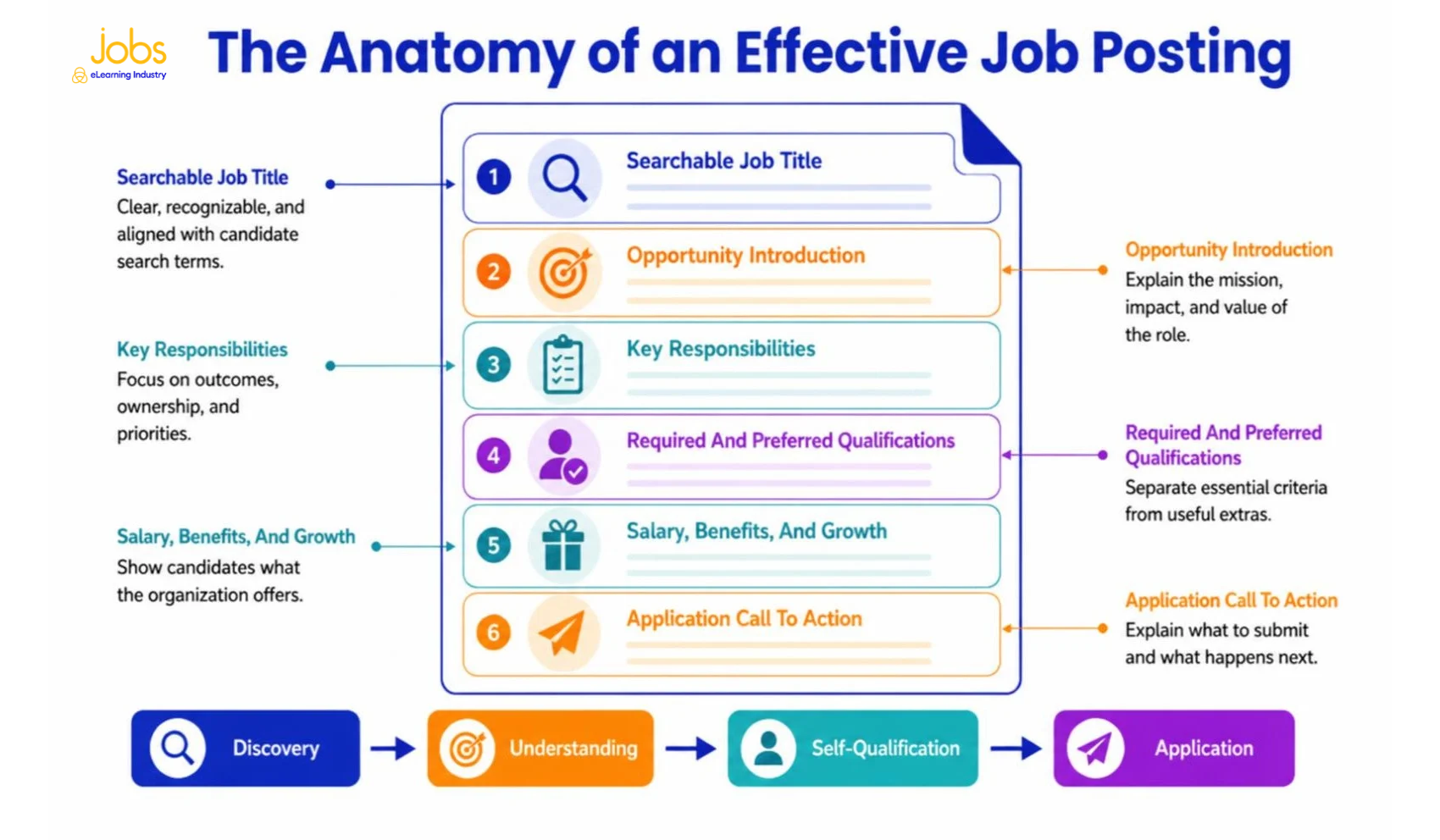
Job postings attract better-matched applicants when every section supports an informed decision. Use the following step-by-step framework to prioritize relevance over promotion alone.
1. Start With A Clear Job Title
Start your job posting with a title that candidates will recognize and search for.
Skip internal titles like "Learning Ninja," "Digital Enablement Partner III," or "Content Excellence Lead." These don't tell candidates much about the actual job.
Instead, go for standard job titles like "Instructional Designer," "Learning Experience Designer," "LMS Administrator," or "Training Manager." Only add seniority or a specialty if it helps clarify the role, such as "Instructional Designer, Healthcare Compliance."
A clear, searchable title helps candidates understand the job and improves your posting's visibility. It also keeps people from clicking on other roles by mistake.
2. Write An Introduction That Sells The Opportunity
A good job posting starts by explaining why the role is important.
Rather than starting with a long company history, talk about what your team wants to achieve, the problem the new hire will help solve, who they'll support, and how they can make a difference.
For example, replace "Founded in 1998, our company has offices in 12 countries" with "You will help redesign onboarding for a global workforce and improve how 8,000 employees reach role readiness."
3. Describe Responsibilities Clearly
Focus on the main outcomes, responsibilities, and priorities instead of listing every possible task.
Five to eight bullet points are usually enough. Start with the most important duties and use action verbs to show what the work is about.
For instance:
- Vague: Create training materials as required.
- Clear: Design digital onboarding that helps new customer-support employees reach proficiency.
or
- Vague: Work with stakeholders.
- Clear: Partner with subject matter experts to define performance needs and approve learning solutions.
4. Separate Required And Preferred Qualifications
Make it clear which skills and experience candidates must have from the start, and which ones are just nice to have.
Put essential skills, credentials, experience, and location restrictions under "Required Qualifications". Place additional tools, industry experience, or credentials under "Preferred Qualifications".
Review degree and years-of-experience requirements carefully. If equivalent experience demonstrates the same capability, say so. Each requirement should help predict performance rather than repeat a convention from an older job description.
5. Highlight Benefits And Growth Opportunities
Strong job postings explain what candidates will get in return for their work.
Share clear details about salary, healthcare, paid time off, retirement plans, bonuses, flexible work, equipment, and professional development if they apply. Include the approved salary range whenever you can or when the law requires it.
Also, allow candidates to know how they can grow, whether through big projects, mentoring, a learning budget, leadership roles, or moving into strategy or management.
6. End With A Strong Call To Action
End your job posting with a clear next step for candidates.
Tell candidates exactly what to submit, where to apply, and if you need a portfolio or work sample. Add any important instructions or screening questions.
For example: "Submit your resume and a portfolio showing two digital learning projects. For each example, explain the audience, business need, your contribution, and the result."
How To Optimize Job Postings For Search Visibility
To reach more people, job postings should be easy for both candidates and search engines to understand.
Candidates usually search using phrases like "remote Instructional Designer jobs" or "LMS administrator." Use these terms naturally, but avoid repeating them too much.
Here are some SEO tips for job postings:
1. Choose a clear, standard job title and leave out any internal codes from the main title.
2. Give helpful details, such as the job's location, whether it's remote or hybrid, the type of employment, level of seniority, and any special focus.
3. Include important terms, like tools, methods, audiences, or industries, but only if they are truly relevant to the job.
4. Make your posting easy to scan by using short paragraphs, clear headings, and simple lists.
5. Design your job posting so that requirements and application steps are easy to read on a phone or tablet.
6. Make sure details like job titles, locations, salary, and work arrangements are the same in both the job listing and the application page.
Google suggests adding job posting structured data to each job page and making sure it matches what candidates see. They also recommend including a full job description with responsibilities, qualifications, skills, and any required experience. For best results, employers should work with their web teams to follow these guidelines. Remember that good search optimization can get people to click, but clear details help the right candidates decide to apply.
Common Job Posting Mistakes That Reduce Applications
Job postings can lose good candidates if they cause confusion, make the process harder than necessary, or set unrealistic expectations.
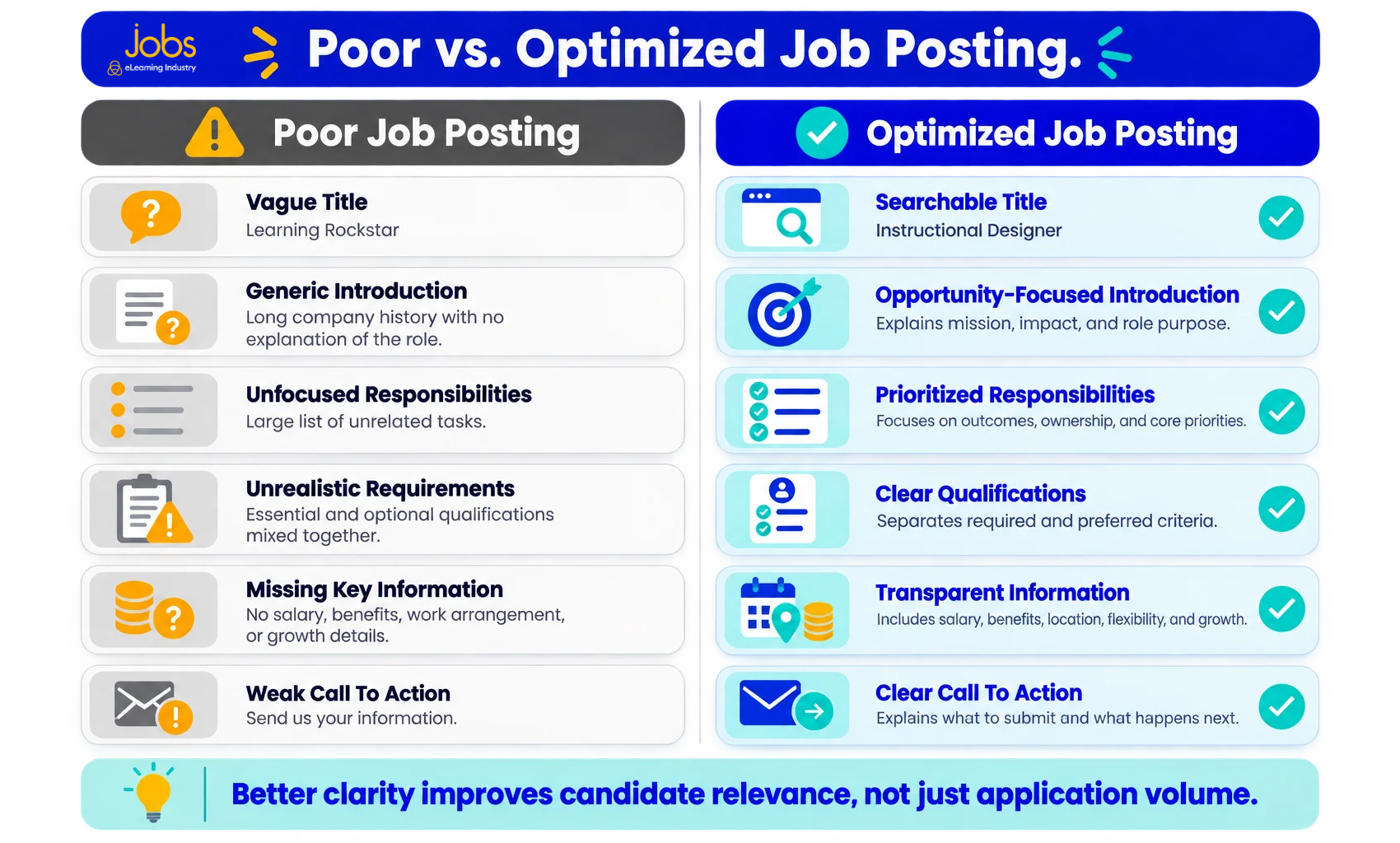
Common mistakes include:
1. Vague job titles make it hard for candidates to find the position or know what level it is.
2. Unrealistic requirements, like asking for too many tools, credentials, or years of experience, can make the ideal candidate profile nearly impossible to find.
3. Long, dense paragraphs can hide important details, especially for people reading on their phones.
4. Leaving out salary information, when you are able to share it, makes it harder for candidates to know if the job is a good fit. Always follow pay-transparency rules.
5. Generic company descriptions, like saying you are "innovative" or "fast-paced," do not mean much unless you give real examples.
6. If the job is remote, be clear about location, time zone, travel, or any office attendance requirements.
7. If the hiring process is not explained, candidates may feel lost. Let them know what to submit and, if possible, outline the main steps.
8. A complicated application process, like asking the same questions more than once, requiring an account, or requesting extra documents, can cause candidates to give up.
Writing Inclusive Job Postings
Inclusive job postings highlight the actual work and avoid language or requirements that might discourage qualified candidates for no good reason.
First, focus on the skills required for the job rather than describing a specific type of person. For example, instead of saying "young and energetic," "digital native," or "recent graduate," say what you actually need, like experience with a specific platform, a willingness to learn new tools, or that the job is entry-level.
Then, review each requirement, like degrees, credentials, travel, language skills, physical demands, and experience. Only include them if they are truly needed for the job. Use clear language, explain any acronyms that might not be familiar, and skip labels like "rockstar" or "guru."
Also, if it applies, let applicants know how they can ask for reasonable accommodations during the application process.
In the United States, the EEOC states that a job advertisement must not show a preference for or discourage applicants based on protected characteristics. For instance, using terms like "females" or "recent college graduates" can raise legal issues. Employers should also check the rules in every area where they hire.
Using inclusive language doesn't lower your standards. It just makes them clearer and easier for everyone to understand.
Continue Building A Smarter Hiring And Career Strategy
Explore our latest guides on hiring trends, optimizing the recruiting process, resume length, job interview questions, and writing an eLearning CV that gets interviews. Whether you are hiring talent or preparing for your next opportunity, these practical resources will help you make more informed decisions at every stage.
- Hiring Trends
- Recruiting Process Optimization: Strategies To Hire Faster In 2026
- How Long Should A Resume Be? One Page, Two Pages, Or More?
- Top Job Interview Questions And How To Answer Them (2026 Guide)
- How To Write An eLearning CV That Gets Interviews
Job Posting Template You Can Adapt
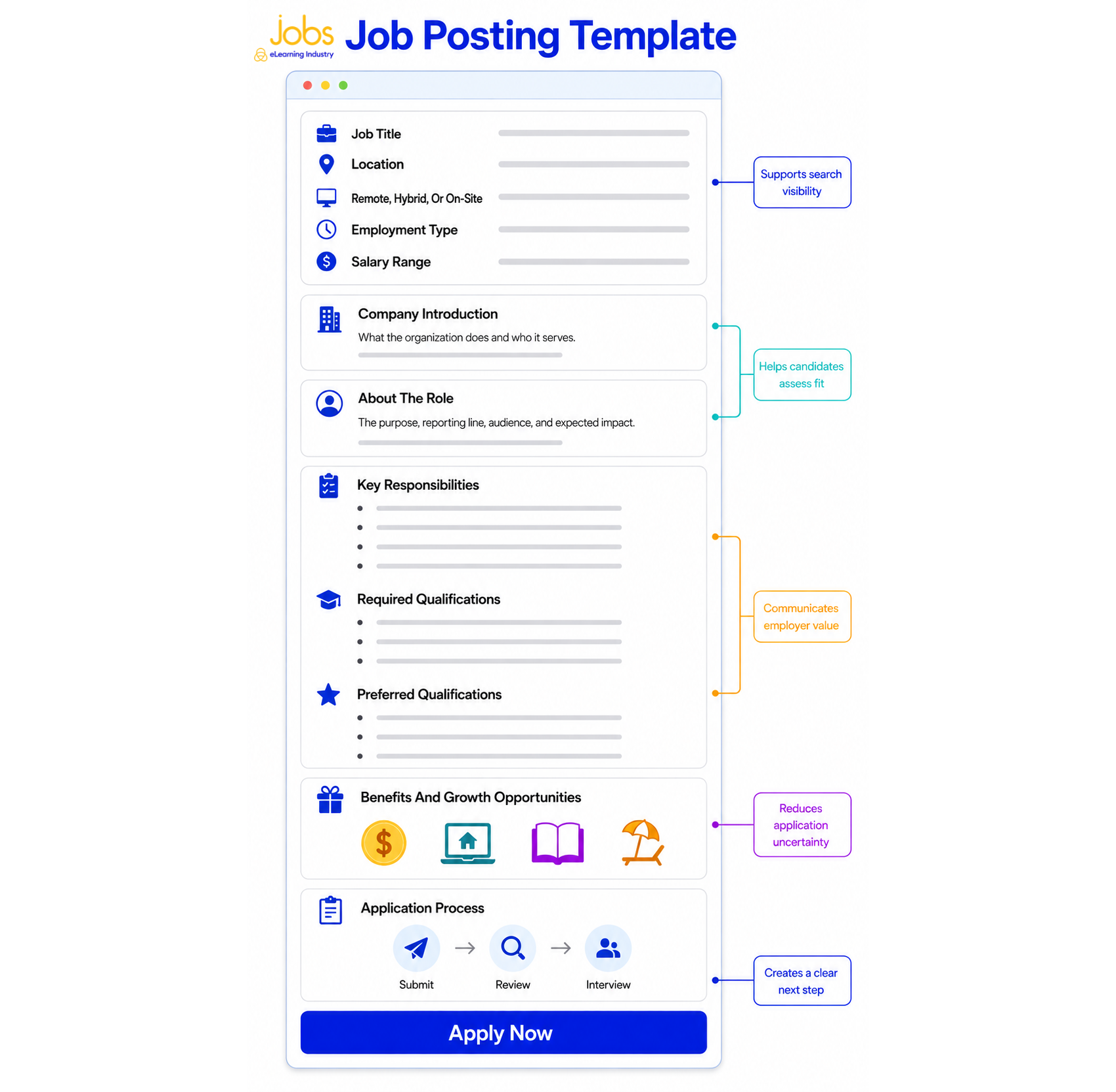
Hiring teams can create job postings more easily and consistently by starting with a shared template, rather than reusing old ads.
Job Title
Choose a clear, standard job title that people are likely to search for. Only add a specialization if it helps explain the position.
Location And Work Arrangement
Say if the job is on-site, hybrid, or remote. Include details about the location, time zone, travel needs, and any work-authorization requirements.
Company Introduction
Describe what your organization does, who it helps, and the reason this job is available.
About The Role
Briefly explain the main goal of the role, who it reports to, who it works with most, and what difference it should make.
Key Responsibilities
List five to eight main responsibilities, focusing on results, and put them in order of importance.
Required Qualifications
Only mention the skills, experience, credentials, and requirements that are truly necessary for the job.
Preferred Qualifications
List any helpful but not required experience, industry knowledge, or familiarity with certain tools.
Salary And Benefits
Share the approved salary range and mention any benefits, flexibility, or support for professional growth.
Application Process
Tell candidates what to send, any deadlines, and what steps they can expect in the hiring process.
Equal Opportunity And Accommodation Information
Include the official wording that matches your company's policy and legal requirements.
Call To Action
Give a clear instruction, for example: "Submit your resume, portfolio, and a short explanation of your role in one featured project."
Treat this job posting template as a checklist for quality, not something to copy word for word.
[IMAGE - Annotated template]
Job Posting Example: Instructional Designer
It's easier for employers to improve job postings when they see how a full framework works for a real role. Below is an example of an imaginary company posting a job ad about an Instructional Designer role.
Instructional Designer Job Posting Example
When writing job postings for instructional designers, be clear about the audience, business needs, design tasks, technology used, and what you expect in a portfolio.
Instructional Designer
Full-time | Remote within the United States | $80,000–$95,000
About Brightstar Learning
Brightstar Learning works with software companies to get customer-facing teams ready for new products and processes. We're growing our learning team to make onboarding better for sales and customer success staff.
About The Role
You will design digital and blended learning experiences that help employees use new knowledge at work. You will report to the Learning Design Manager, lead projects from start to finish, and work with experts from product, sales, and customer success teams.
Key Responsibilities
- Identify performance needs, audiences, constraints, and success measures.
- Design onboarding, product education, simulations, job aids, and facilitator resources.
- Create storyboards and develop interactive learning in Articulate 360.
- Manage reviews and revise content using stakeholder feedback and learner data.
- Evaluate solutions and recommend improvements.
Required Qualifications
- 3 or more years of Instructional Design or related experience.
- A portfolio demonstrating digital learning design and development.
- Experience applying an Instructional Design process to workplace needs.
- Strong writing, project management, and stakeholder communication skills.
Preferred Qualifications
- Experience with Articulate Storyline and Rise.
- Familiarity with software-as-a-service products or customer education.
- Experience designing scenario-based practice or performance support.
Benefits And Growth
This job comes with health insurance, paid time off, retirement contributions, support for your home office, and a yearly budget for professional development. You'll also have the chance to lead projects across teams and help set learning design standards.
How To Apply
Submit your resume and two portfolio samples. For each sample, explain the audience, problem, your role, key design decision, and result. Selected candidates will complete a recruiter conversation, portfolio discussion, and structured team interview.
Brightstar Learning is an equal opportunity employer. Applicants may request a reasonable accommodation during the application process.
Why This Job Posting Example Works
Job postings are more effective when every detail helps the right candidate decide if the job is a good fit.
This example:
- Uses a recognizable, searchable title.
- Explains the business purpose before listing tasks.
- Separates required capabilities from preferred experience.
- Shares compensation, work arrangement, benefits, and growth.
- Requests portfolio context rather than unexplained samples.
- Sets expectations for the main stages of the hiring process.
How To Measure Whether Your Job Posting Is Working
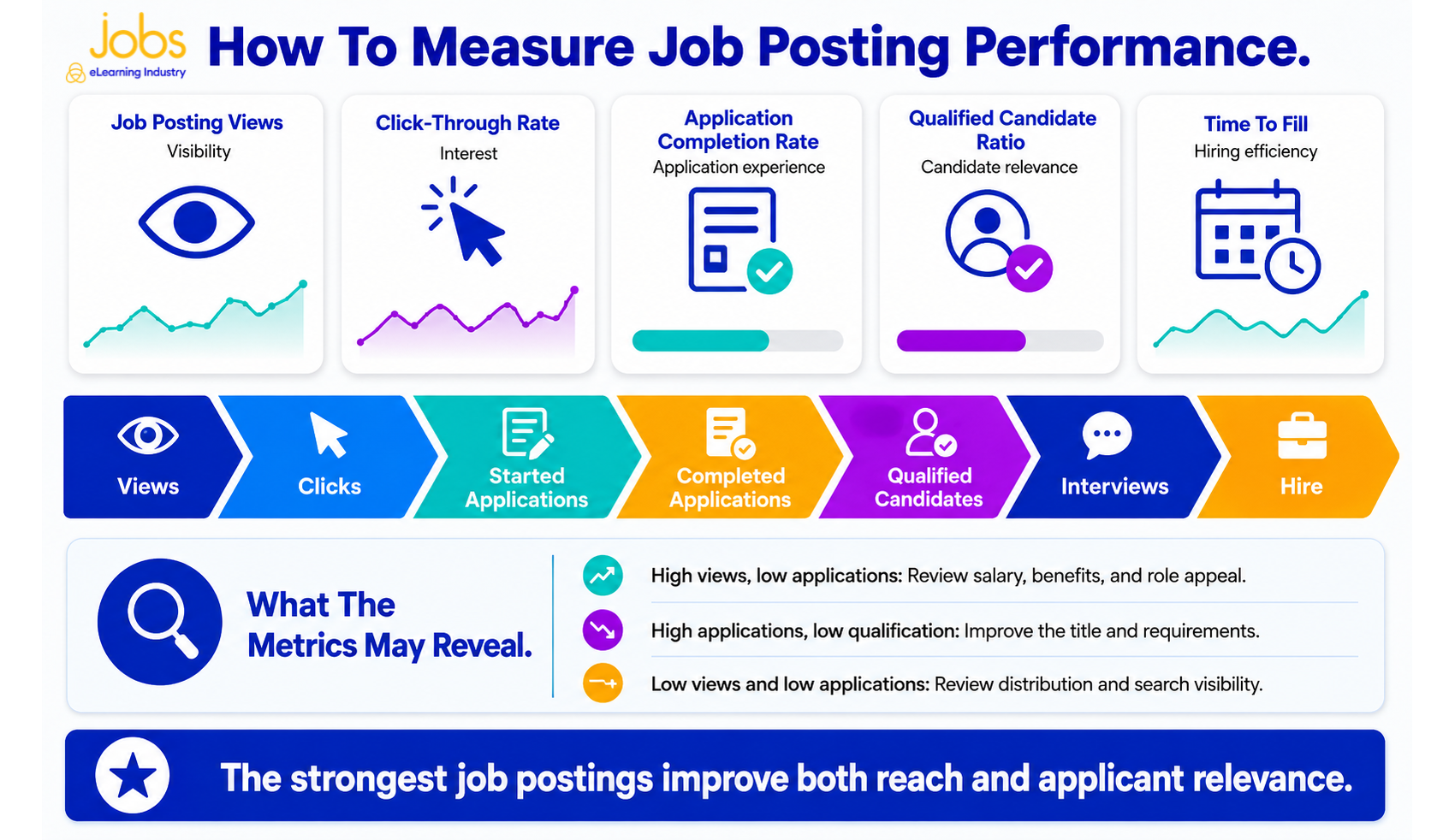
Job postings should be measured by response relevance, not application volume alone.
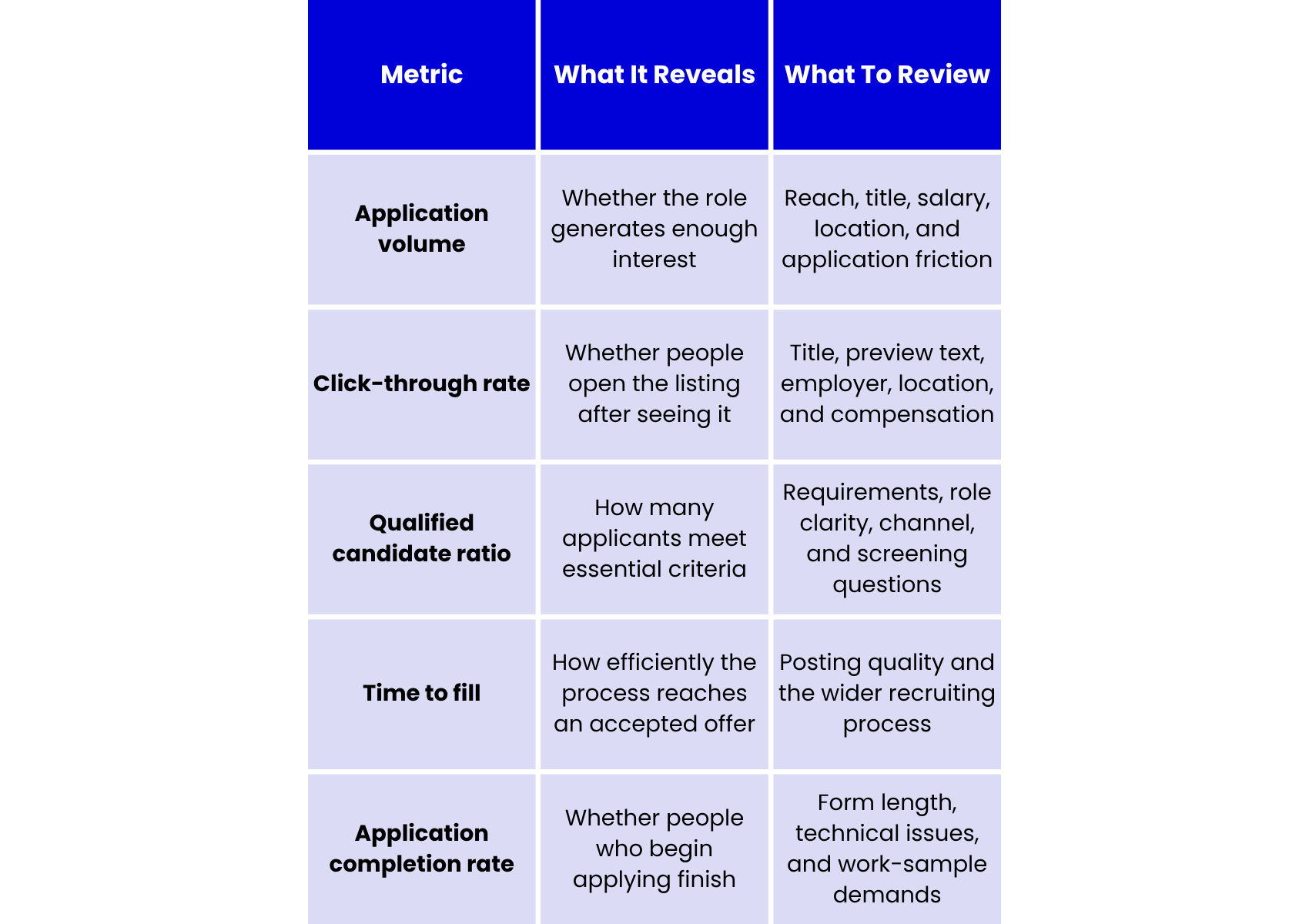
To find the qualified candidate ratio, divide the number of qualified applicants by the total number of applicants, then multiply by 100. Make sure to decide what "qualified" means before you start reviewing applications so your results are consistent.
If you see a lot of views but not many applications, check your compensation, benefits, work setup, and whether the application process is too complicated. In case you get many unqualified applicants, try updating the job title and the list of essential qualifications. Now, if both views and applications are low, the main issue might be how you are sharing the job posting.
Why Specialized Job Platforms Attract Better Candidates
Job postings on specialized platforms exchange some broad exposure for greater audience relevance and intent.
General job boards reach a wide range of people from many industries and career paths. As a result, employers often need to spend more time filtering for candidates with the right skills or experience.
Specialized platforms focus on a specific professional community. They help employers connect with people who know the field, use industry terms, increase their visibility in the right context, and reduce unrelated applications.
Jobs by eLearning Industry is designed for roles in eLearning, Learning and Development, training, HR focused on learning, EdTech, and similar areas. Employers can post jobs with details like title, location, remote options, job type, category, tags, salary, description, and how to apply. Our platform gives organizations in the learning field a direct way to reach candidates who are already interested in these careers.
However, even with a specialized platform, a good job ad is still important. The platform brings the right audience, but the posting needs to stand out by being clear, setting realistic expectations, offering real benefits, and making it easy to apply.
Ready to attract better candidates?
Publish your next job posting on Jobs by eLearning Industry and connect with professionals actively looking for opportunities in eLearning, Learning & Development, HR, and EdTech.
FAQs About Job Postings
1. What is a job posting?
A job posting is a public ad that explains an open position and invites qualified people to apply. It usually lists the job title, a summary of the role, main duties, required skills, pay or benefits, work setup, and how to apply. Unlike internal job descriptions, job postings are meant for people who might want to join the company.
2. How do you write a job posting that attracts candidates?
To attract the right candidates, use a clear job title, explain what the role is for, and describe the main goals. List required and preferred qualifications separately. Share details about pay, benefits, location, flexibility, and chances to grow. End with easy-to-follow application steps and a clear invitation to apply.
3. What is the difference between a job posting and a job description?
Job postings are ads meant for candidates to promote an open job and get people to apply. A job description is usually for internal use and explains the duties, who the role reports to, the needed skills, and what is expected. Employers often start with the job description and then turn it into a shorter, more appealing posting.
4. How can employers optimize job postings for search?
To help job postings show up in searches, use a common job title and words that candidates are likely to use. Add the location, job type, work setup, needed skills, and industry terms in a natural way. Use clear headings, short paragraphs, and simple lists so people can quickly scan the posting, even on their phones.
5. What information should every job posting include?
Every job posting should list the job title, location, work setup, job type, a short company intro, the role's purpose, main duties, required and preferred skills, pay or benefits, and how to apply. If things like travel, time zones, a portfolio, or work permits matter, mention them so candidates know if they are a good fit before applying.