?
{{job.title}}
{{job.company_name}}
Private Employer
Resume Tips 2026: Get Noticed For eLearning, L&D, And EdTech Jobs
The most useful resume tips are straightforward: focus on a specific job, highlight your relevant skills, and make your experience easy to read. If you work in eLearning, L&D, or EdTech, describe what you designed, delivered, managed, or improved, instead of just listing the software you used.
Whether you are new to the field or aiming for a leadership role, your resume should show how your experience matches what the employer is looking for. Begin with the job description, choose your best examples, and leave out anything that does not support the fit.
Ready to identify your next opportunity?
Explore eLearning and L&D jobs while you build your resume.
Hiring Trends: What Your Resume Needs To Demonstrate
The U.S. Bureau of Labor Statistics expects jobs for training and development specialists to grow by 11% from 2025 to 2035. This growth is driven by the need for new skills and changing technology. Keep in mind, though, that this is a long-term outlook and does not mean every EdTech company is hiring right now.
LinkedIn’s 2026 Talent Report shows how skills, AI, learning, and moving within a company are all connected. For job seekers, the main point is to show how your work helps your organization adapt to change.
When it fits, explain how you measured if learning was effective, helped your team use new technology, or made sure AI-generated content was accurate. It is better to describe what you did than just list the tools you used.
For more hiring trends, visit our complete guide.
Career Overview: Match Your Resume To Your Target Role
Use this information to help you decide what information should take up the most space on your resume. The priorities listed here help separate similar career paths, but keep in mind that not every employer sees them the same way.
- Instructional Designer jobs: Needs analysis, storyboards, assessments, and learning outcomes.
- eLearning Developer jobs: Interactive modules, accessibility checks, and course publishing.
- LMS Administrator jobs: User management, reporting accuracy, integrations, and troubleshooting.
- Learning Experience Designer jobs: Learner research, prototypes, usability testing, and iteration.
- Learning and Development jobs: Facilitation, program evaluation, stakeholder collaboration, and strategy.
If you are applying for entry-level jobs, focus on real projects and skills that can transfer to the new role. For mid-level positions, highlight times you took charge and made things better. If you are aiming for management, show your experience leading teams, managing budgets, and aligning your work with business goals, rather than listing every course you have created.
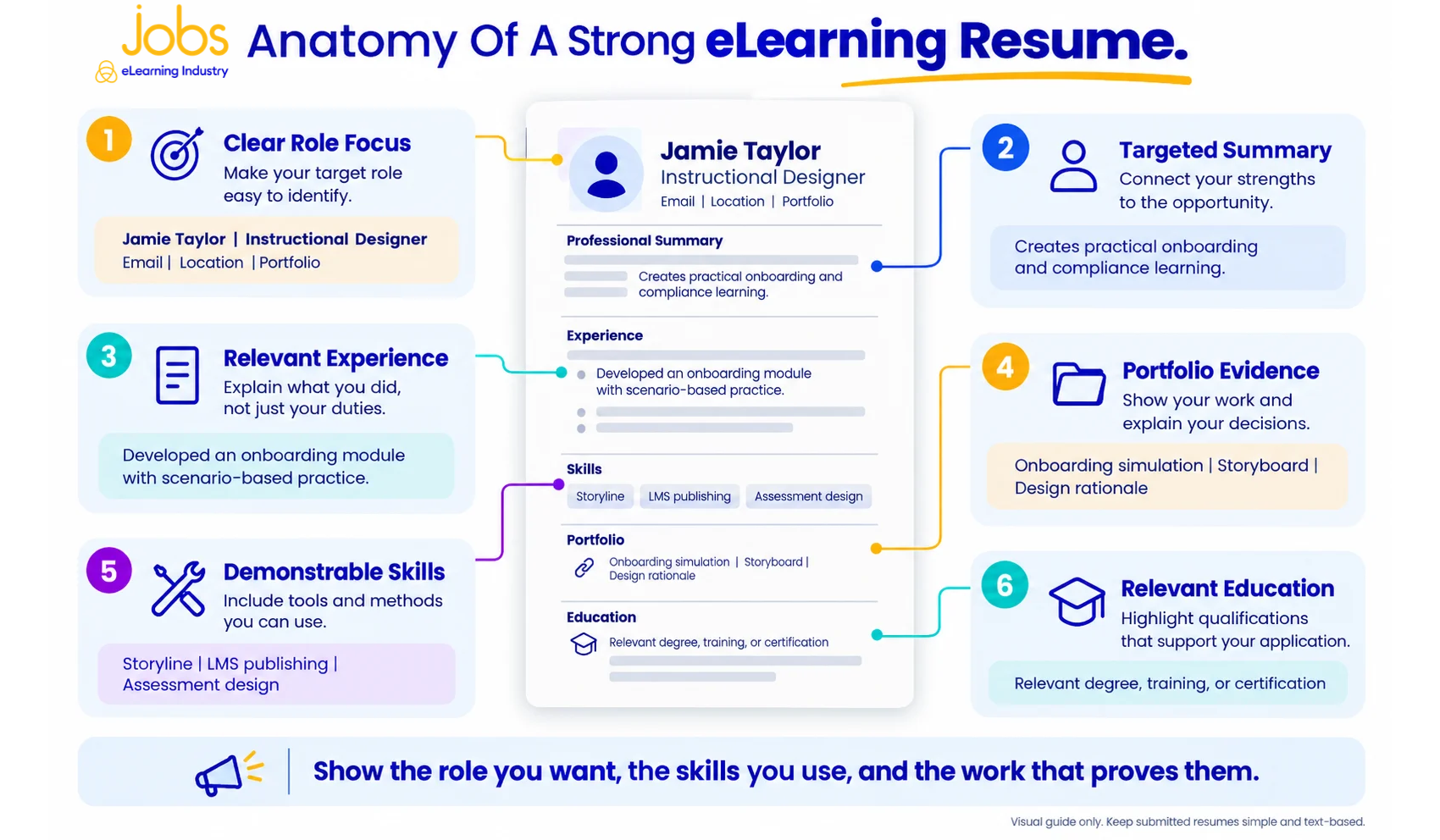
What To Include In A Resume
Follow this outline to decide what to include in your resume. Arrange the sections to highlight your most relevant strengths, and make sure your employment dates are easy to follow.
- Contact details: Add your name, a professional email address, phone number, location, and a link to your portfolio if it applies.
- Targeted summary: In two or three clear sentences, describe your area of expertise and what you offer.
- Experience: List your most recent jobs first. Focus on what you achieved, not just your job duties.
- Relevant skills: List the tools and methods you know well, like Storyline, Moodle, facilitation, or assessment design.
- Education and projects: Add your relevant degrees, certifications, and any independent or volunteer work, making sure each is clearly labeled.
A good resume makes relevance visible. Remove unsupported skill ratings, generic personality claims, and unrelated details that crowd out stronger evidence.
Here’s an example of a professional summary for someone with experience:
“Instructional designer with four years of experience developing onboarding and compliance learning. Combines Storyline development, stakeholder interviews, and assessment design to turn complex procedures into practical training.”
Use this as a guide, but make sure your summary reflects your own background.
Professional Resume Examples: Show Evidence, Not Just Duties
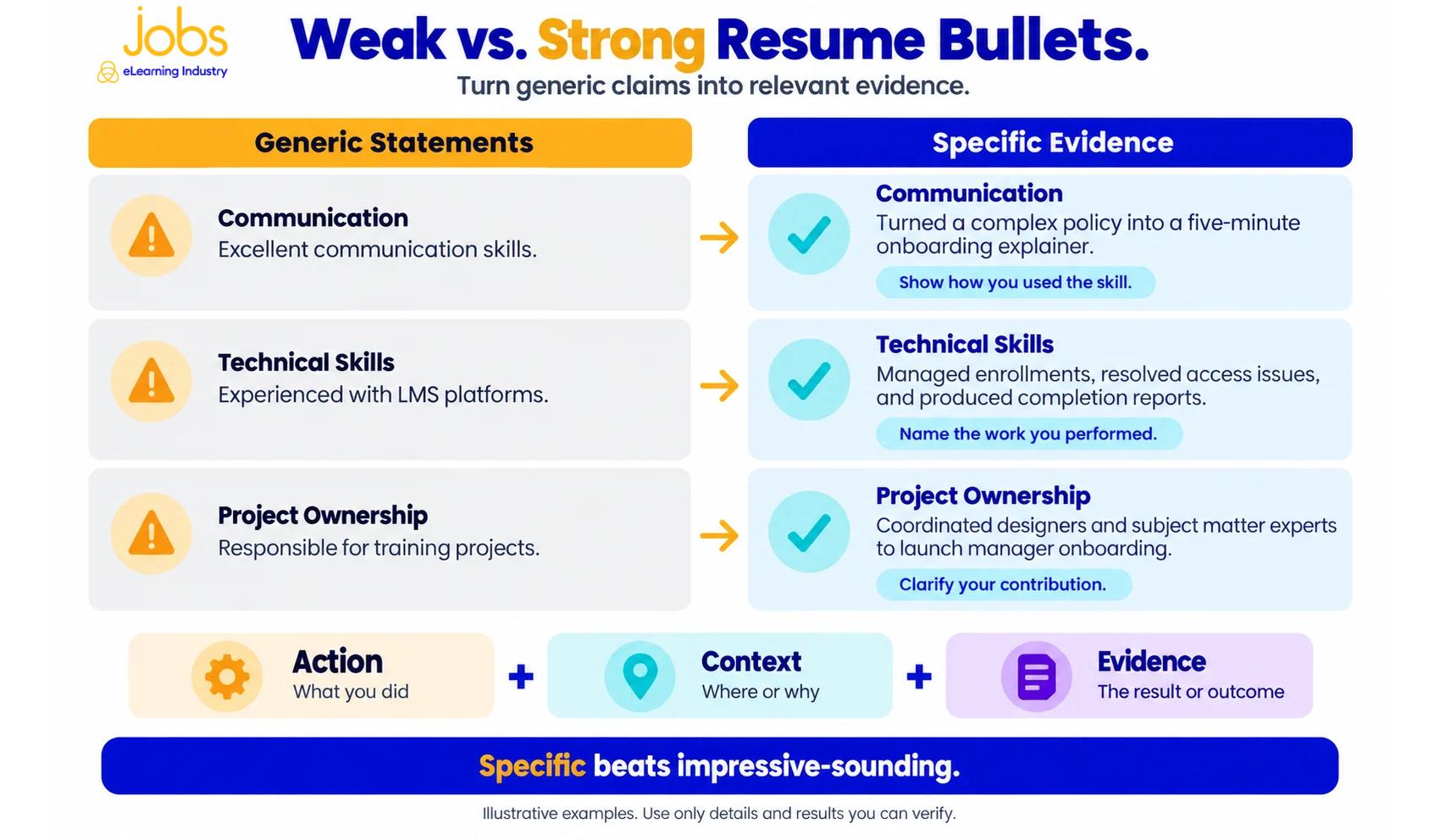
A strong resume links what you did, the situation, and the results. The examples below offer sample wording, but be sure to use your own real numbers and achievements.
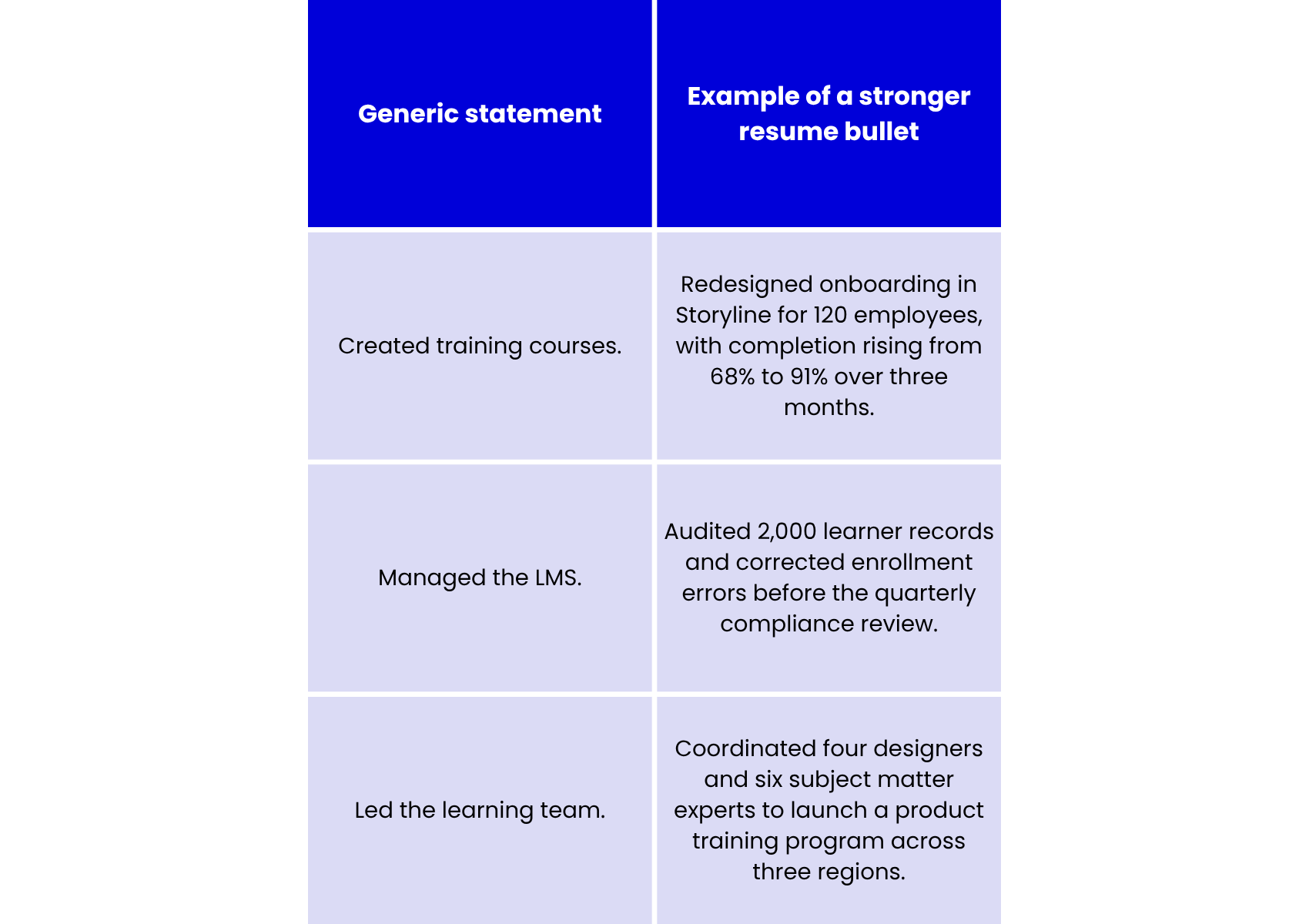
The table shows three types of evidence: results, the size or scope of your work, and leadership roles. Pick the example that matches your real experience. If you do not have exact numbers, describe your audience, what you delivered, any limits you faced, or feedback you received instead of making up results.
How To Make A Resume For Your First Job
If you are unsure how to make a resume, start by looking at what the job requires most.
- Focus on showing what you can do, rather than saying you lack experience. You can use examples from your classes, volunteering, internships, helping peers, or personal projects to show your skills.
- For example, you could make a short onboarding module. Describe who it is for, what it teaches, how you check learning, and how you made it accessible. Make sure to call it an independent project, not client work.
- If you are changing careers, show how your past experience fits the new role, but do not change the facts. For example, a teacher can talk about designing assessments and giving feedback, while someone from customer support can explain products and solve problems. Always use your real job titles.
- When making your resume, focus on a few strong examples that demonstrate your skills, rather than listing many things without evidence.
Ready to strengthen your entire job application?
Explore our career resources to find a cover letter sample, learn how long your resume should be, discover entry-level eLearning jobs, prepare for top job interview questions, and understand the skills employers look for in eLearning professionals.
- Cover Letter Sample: Templates & Examples For Every Job
- How Long Should A Resume Be? One Page, Two Pages, Or More?
- Entry-Level eLearning Jobs: What To Apply For With No Experience
- Top Job Interview Questions And How To Answer Them (2026 Guide)
- Top Skills Employers Look For In eLearning Professionals (2026 Guide)
Best Resume Templates And Formatting
What makes a resume stand out? Use clear headings, easy-to-read text, even spacing, and a logical order. A good template should highlight your experience, not distract from it.
The Harvard resume format is a helpful example because it uses clear language, a consistent look, and lists experience from most recent to oldest. You can adjust its structure to fit your own background. However, using this style does not mean you are connected to Harvard.
When looking at resume templates, pick one you can easily edit and that has space for your achievements and portfolio details. Keep creative designs for your portfolio. The best templates are easy to customize and still easy to read.
ATS-Friendly Resume Tips For 2026
Applicant Tracking Systems (ATS) often pull details from your resume into application forms. For instance, Greenhouse may have trouble reading columns, graphics, complex tables, or contact information placed in headers or footers.
Keep your resume layout simple, use standard section headings, and ensure all text is selectable. Always use the file format the employer asks for, and double-check any fields that are filled in automatically before you submit.
Use wording from the job posting only if it truly matches your experience. For instance, mention “Learning Management System (LMS) administration” if it applies to you. Do not add hidden keywords or overstate your skills. Good formatting makes your resume easy to read, but it cannot make up for missing qualifications.
Before you apply, compare your resume with the job posting. Make sure you can show proof for the three most important requirements. Check that your portfolio is accessible, test all links, and confirm that your job titles and dates match your application form. Save each resume with a clear name for every job, so you do not have to guess later.
Put These Resume Tips Into Practice
Choose a target role, strengthen your evidence, and check your application before submitting. For additional resume help, review our eLearning CV guide and prepare a tailored cover letter.
Explore the eLearning, L&D, and EdTech jobs below. Create an account, upload your CV, and set personalized job alerts to keep relevant opportunities within reach.
FAQs About Resumes
1. How Do You Write A Resume?
Start by reviewing the job description, selecting relevant experience, and building a clear structure. Then write achievement bullets, add demonstrable skills, and proofread. These resume writing tips apply whether you are creating a new document or updating an existing work resume.
2. What Are Three General Tips For Your Resume?
Tailor it to the role, support your claims with evidence, and make it easy to read. For learning careers, connect skills to actual projects rather than relying on a list of software or certifications.
3. What Are Five Format Tips For A Resume?
Use one column, choose a readable font, keep dates consistent, use familiar headings, and leave adequate white space. When deciding how to format a resume, follow the employer’s submission instructions before applying any template’s default settings.
4. How Do You Make A Resume Stand Out?
Show relevant achievements, explain your contribution, and link to appropriate work samples. Strong examples demonstrate your decisions and results. Avoid confidential materials, decorative skill charts, and claims you cannot explain during an interview.
5. How Long Should An eLearning Resume Be?
Aim for one page when your relevant experience is limited. Use two when substantial projects, leadership responsibilities, or technical expertise justify the space. Prioritize useful evidence instead of shrinking the font to meet an arbitrary limit.
6. Can AI Provide Resume Writing Help?
Yes. Use AI to suggest edits, identify unclear wording, or compare your draft with a job description. Verify every suggestion and retain your own voice. Harvard recommends using AI as an editing aid, not the primary author.
Jobs {{total_jobs_count}}
{{pagination_label}}
No jobs were found.
Loading...
{{notification.msg}}