

Job Application Forms: All You Need To Know To Be Prepared
Job application forms often seem repetitive, especially if you’ve already uploaded your resume and are then asked to fill in your work history, education, and contact details again. Still, these forms have a purpose. They let employers gather the same information from everyone and ask questions that might not be covered in your resume.
If you know how to fill out a job application properly, you’re less likely to leave out details, give inconsistent answers, or make mistakes. Whether you’re applying for your first job or looking for a new position, this guide covers what employers ask, how to get your information ready, how to answer tough questions, and what to review before you submit your application.
Getting ready to apply for your next job?
Check out current openings in eLearning, L&D, Instructional Design, and EdTech, and see what information employers are looking for.
What Is A Job Application Form?
A job application form is a document that employers use to gather the same information from everyone applying for a job. You might fill it out online, on paper, by email, or in an applicant portal. These forms usually ask for your personal details, work history, education, qualifications, availability, and whether you are allowed to work.
Employers use job application forms to make sure they get the same information from every applicant, spot any missing details, check if you meet the job requirements, and keep track of any needed permissions or declarations.
For example, your resume might say you worked as an Instructional Designer for three years. The application form could ask for your exact employment dates, your previous supervisor’s name, your main duties, and why you left the job.
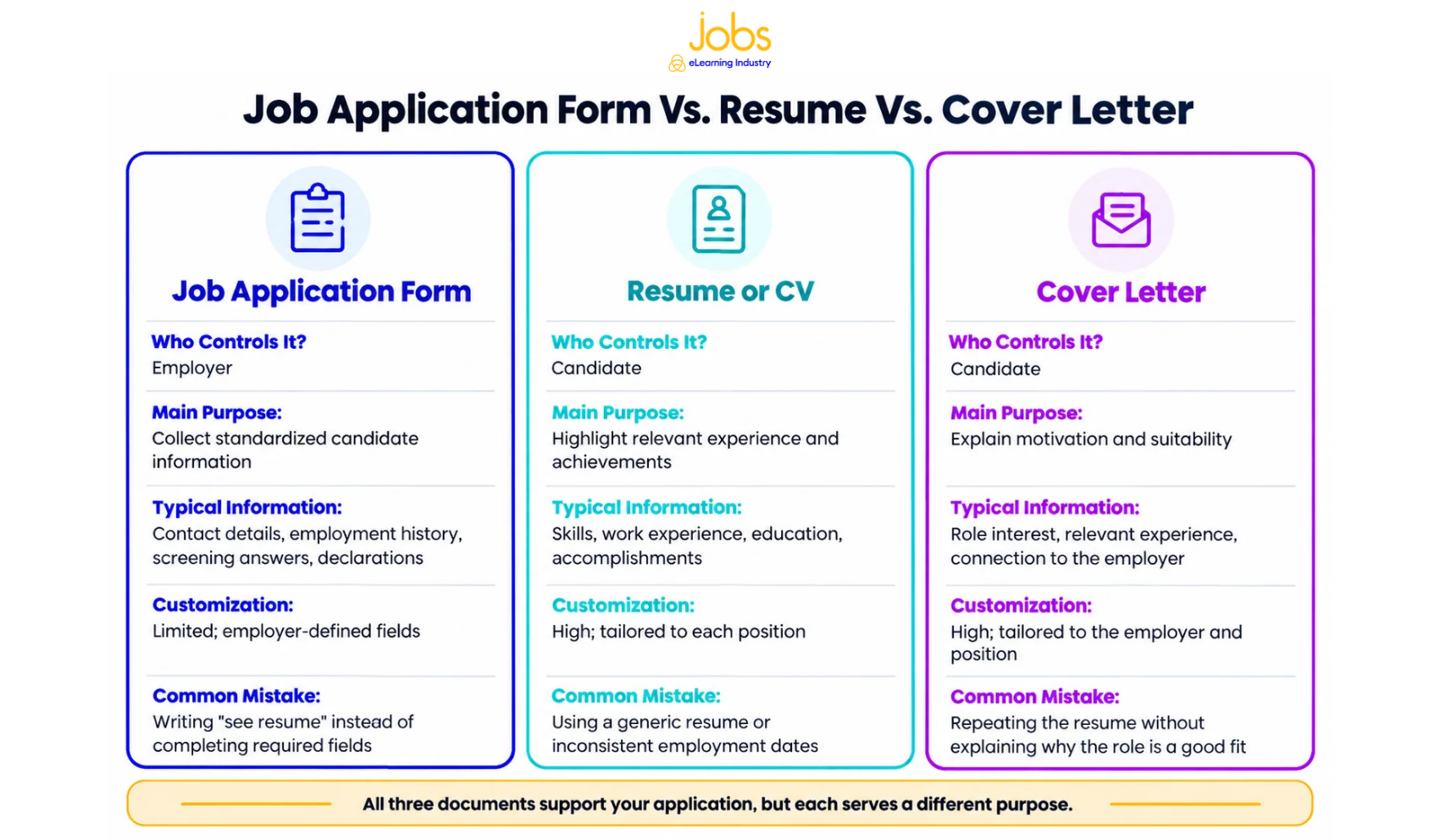
Job Application Form Vs. Resume Vs. Cover Letter
Even though all these documents are part of the hiring process, each one has its own purpose.
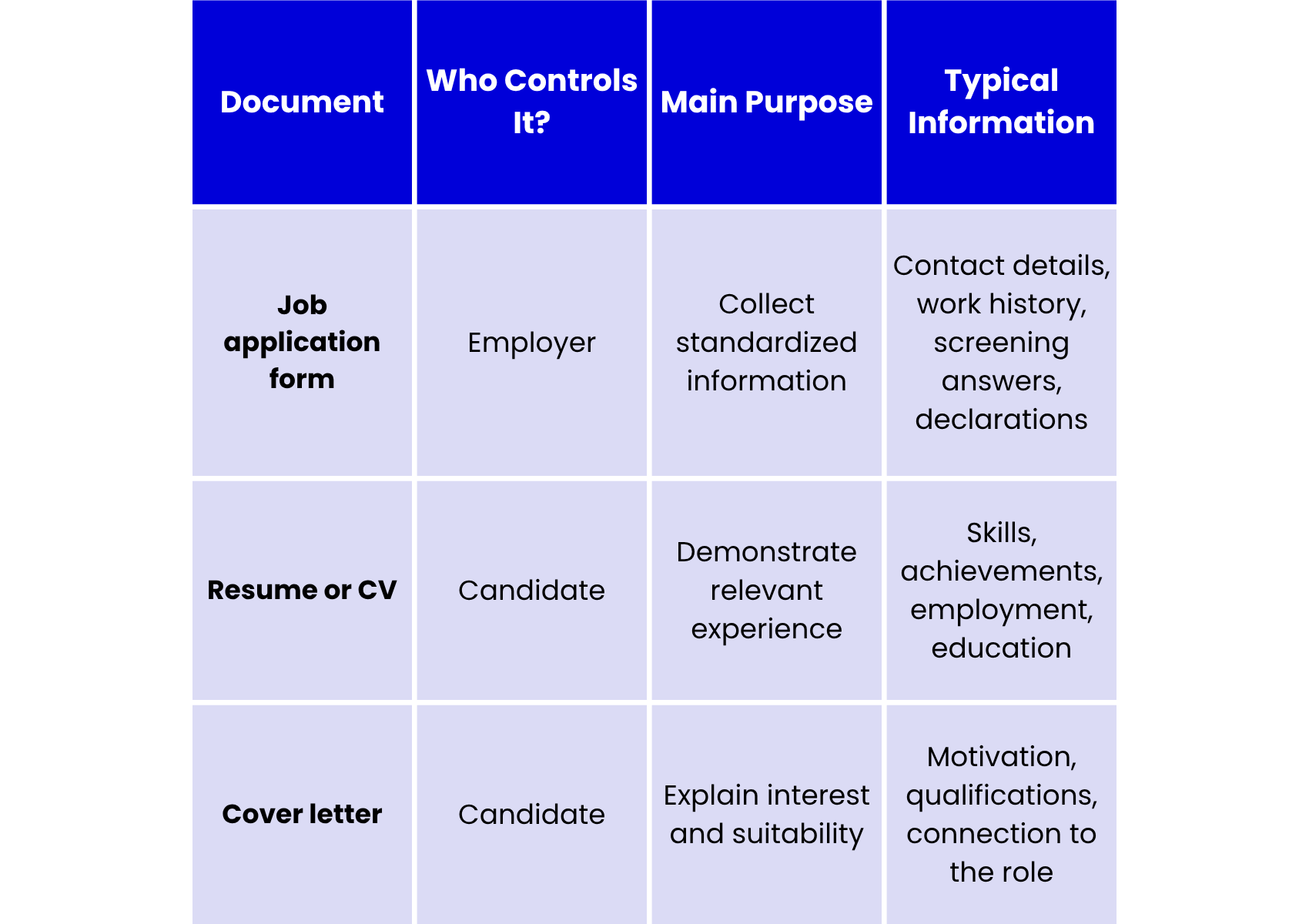
Your application form and resume should complement each other, not contradict each other. If you're updating your application materials, review these resume tips for L&D and EdTech professionals.
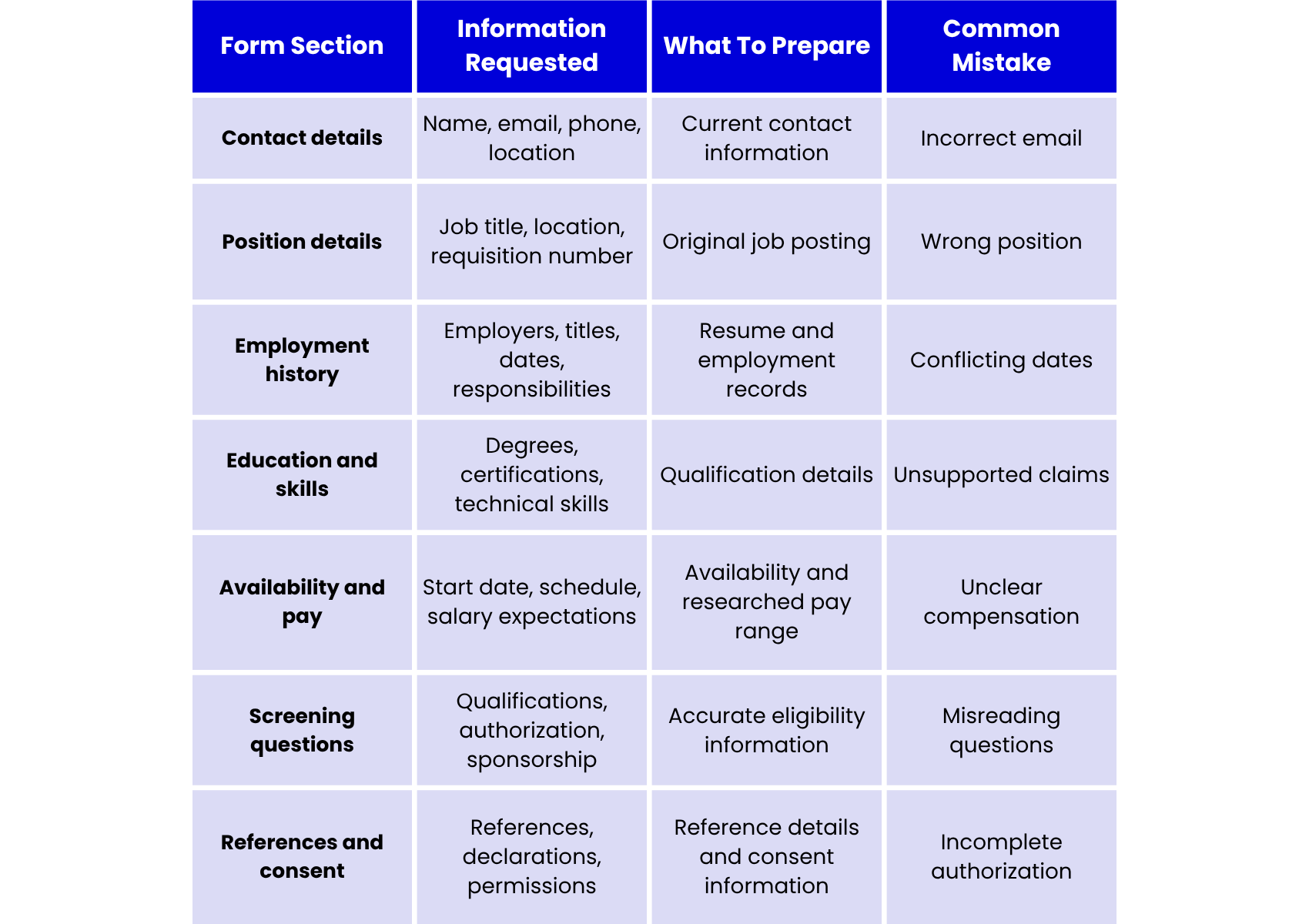
What Information Do Employers Ask For On Job Application Forms?
Job application forms usually ask for your contact details, the job you’re applying for, your work history, education, skills, when you can start, if you’re allowed to work, references, and some questions specific to the job. The exact questions can vary depending on the employer, industry, and role. Here’s a brief summary of what you’ll need to fill out a job application.
Personal And Contact Information
Most forms start by asking for your full name, email address, phone number, and location. Some may also ask for your mailing address or how you prefer to be contacted.
Make sure to use an email account you check often and double-check that you’ve typed it correctly. Even a small mistake can stop an employer from contacting you.
Position And Application Details
Employers might ask for the exact job title, department, work location, type of employment, preferred shift, and requisition number.
For instance, a company could post both junior and senior Instructional Designer jobs. Make sure you’re applying for the right role, location, and level.
Employment History
The employment history section is usually the most detailed. You’ll likely be asked about your previous employers, job titles, dates of employment, main duties, achievements, supervisors, and why you left each job.
Give all the information asked for, even if it’s already on your resume. Only write "see resume" if the employer specifically says it’s okay.
Keep your answers relevant, concise, and consistent. For more guidance on presenting your professional background, see how to write an eLearning CV that gets interviews.
Education, Training, And Certifications
Employers may ask about your degrees, where you studied, when you graduated, any certifications you have, and any ongoing training or professional development.
If you’re applying for L&D or EdTech jobs, relevant qualifications can include Instructional Design certifications, accessibility training, LMS administration credentials, learning analytics, or courses on authoring tools.
Be clear about your qualifications and make sure to separate completed certifications from those you’re still working on.
Skills, Portfolios, And Professional Links
Many applications ask you to show your technical and professional skills. For Instructional Designer jobs, this might mean highlighting needs analysis, storyboarding, assessment design, and eLearning development. An LMS Administrator might emphasize reporting, user management, and platform troubleshooting.
Add your LinkedIn profile, portfolio, and work samples if asked. Pick examples that show the skills employers want in eLearning professionals.
Availability, Location, And Compensation
You may be asked about your earliest start date, preferred schedule, willingness to travel or relocate, and whether you can work remotely, on-site, or in a hybrid setup.
Some employers will also ask about your salary expectations. Make sure to check if they want hourly pay, an annual salary, or another type of pay before you answer.
Work Authorization And Sponsorship
U.S. employers may ask if you’re legally allowed to work in the country and if you’ll need visa sponsorship now or later. These are separate questions. Work authorization is about whether you can work now, while sponsorship is about whether you’ll need the employer’s help with immigration. Neither one is the same as citizenship.
Screening questions on the application are different from Form I-9 employment verification, which happens after you accept a job offer.
References, Declarations, And Background-Check Consent
Some forms may ask for professional references, permission to contact your previous employers, confirmation that your information is correct, or your electronic signature.
Be sure to read background-check disclosures carefully. Under the U.S. Fair Credit Reporting Act, employers who use third-party background reporting companies usually have to give you a written disclosure and get your written permission before running a check.
Voluntary Demographic And Sensitive Questions
Some applications include voluntary questions about your demographic information or disability status. These are different from questions that check your job qualifications.
In the United States, the EEOC advises employers against asking about protected characteristics and generally prohibits preoffer disability-related inquiries, subject to limited exceptions. When available, you may choose "Prefer not to answer" for voluntary questions.
Protect your privacy, too. The FTC advises against including Social Security numbers or banking information on ordinary job applications or resumes.
Hiring laws vary by location. These are general U.S.-focused guidelines and not legal advice.
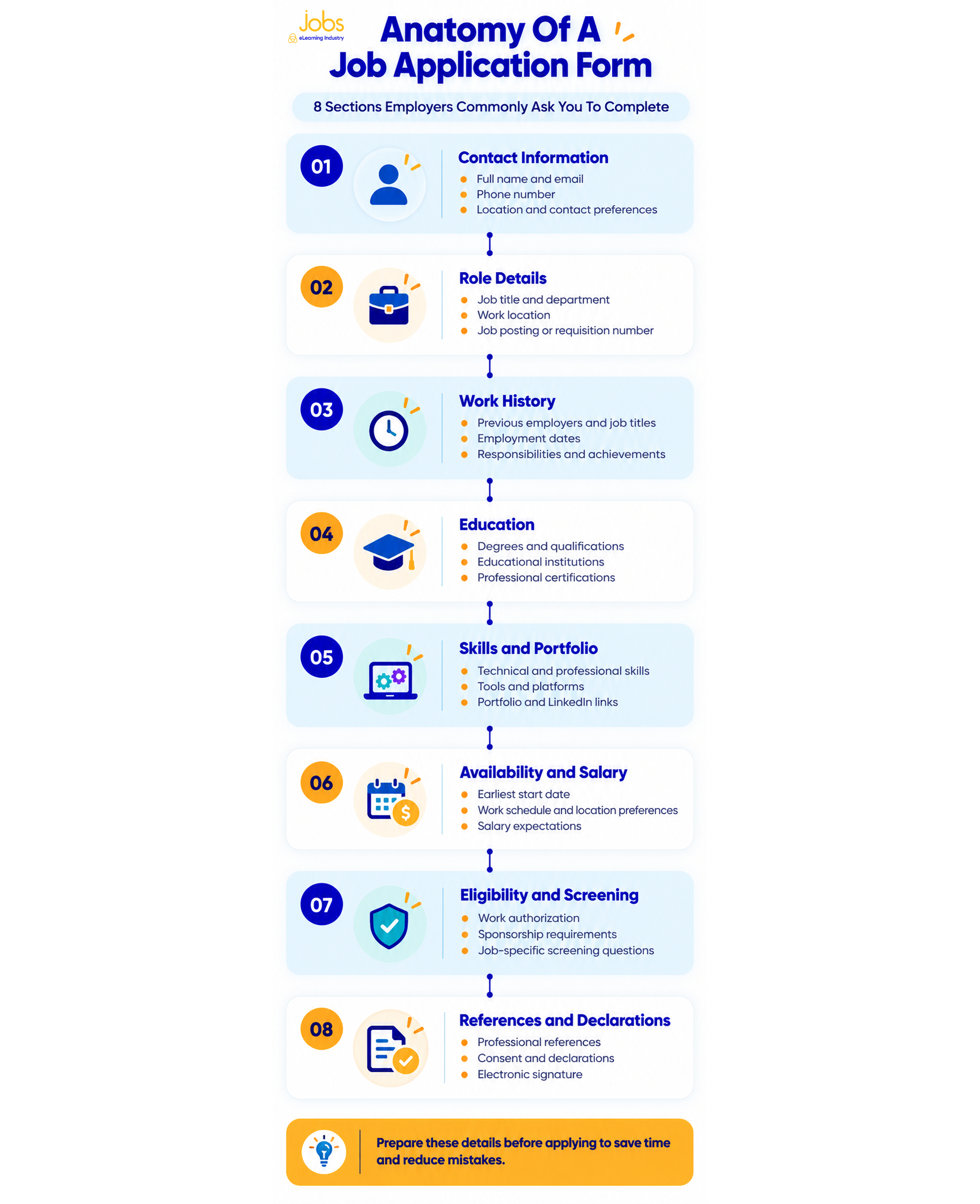
What Should You Prepare Before Filling Out A Job Application Form?
Before you start filling out a job application, collect the information that employers usually ask for. Having these details ready will make it easier to complete several applications and help you keep your answers consistent.
Here’s a checklist to help you get ready:
1. A current resume tailored to the position.
2. Exact employment dates and official job titles.
3. Previous employer names and locations.
4. Short descriptions of responsibilities and achievements.
5. Education, training, and certification details.
6. Professional references and their current contact information.
7. Permission from those references.
8. LinkedIn, portfolio, and professional website links.
9. Accurate work-authorization information.
10. Your availability and potential start date.
11. A researched compensation range.
12. Clearly named resume, cover letter, and portfolio files.
13. A copy of the complete job description.
You might want to make a private worksheet with details you use often in applications. Just be sure not to keep sensitive ID or banking information in a document that isn’t secure.
Before you begin an online job application, check what files you’ll need, if you can save your progress, and how much time it might take. Try to use a secure internet connection whenever you can.
Keep your job-search information organized.
Create a candidate profile on Jobs by eLearning Industry, upload your resume, and record your experience, expertise, and work preferences.
How To Fill Out A Job Application Form Step By Step
Filling out a job application is more than just typing information into boxes. You should read the instructions, give answers that fit the job, and review your details before you submit.
Here are 10 steps to help you.
Step 1: Read The Entire Form Before Entering Information
Look over the form and note which fields are required, which questions are optional, any character limits, date formats, document uploads, and deadlines.
Check whether the application includes any assessments or additional screening questions. This way, you can gather what you need before you start.
Step 2: Confirm The Position
Make sure you have the right company, job title, department, location, seniority level, and requisition number.
This is important if the employer lists similar jobs in different departments or locations. Double-check that your application matches the job you want.
Step 3: Enter Contact Information Consistently
Use the same name, email, phone number, and location as you have on your resume and candidate profile.
Double-check spelling, country codes, and email formatting. If you've recently moved or changed phone numbers, update your other application materials accordingly.
Step 4: Complete Every Relevant Work-History Field
List your official job titles, employers, dates of employment, main responsibilities, and key achievements.
If a form asks for details that are already on your resume, fill them in again unless the instructions say not to.
For each job, highlight the responsibilities that match the position you want. Avoid making up dates, changing job titles to seem more senior, or overstating your results.
Step 5: Tailor Skills And Short Answers To The Role
Look over the job description and note which qualifications the employer values most.
If you’re applying for Learning and Development roles, skills like facilitation, needs analysis, program evaluation, and stakeholder management are important. For EdTech jobs, focus on skills such as software implementation, LMS support, or working with learning technologies.
Use the employer's terminology where it accurately reflects your experience, but avoid keyword stuffing.
Step 6: Answer Screening Questions Accurately
Job application questions may cover your availability, location, required certifications, work authorization, sponsorship needs, willingness to travel, and compensation expectations.
Some employers use Applicant Tracking Systems (ATS) that include screening or knockout questions to check if candidates meet the main requirements. So, read every question carefully. Don’t choose an answer that isn’t true just to get to the next step.
Step 7: Upload The Correct Documents
Make sure you upload the correct version of your resume and that the file meets the employer’s format and size requirements. If the application asks for a cover letter, use one tailored to the role rather than a generic version. You can use these cover letter examples for guidance.
Lastly, check that your portfolio links work and that others can access them.
Step 8: Review Consent And Certification Statements
Read any statements about information accuracy, reference checks, how your personal data will be used, and background checks.
An electronic signature or checkbox can give permission for certain actions. Make sure you know what you’re agreeing to before you continue.
Step 9: Proofread And Submit
Review your contact details, employment dates, qualifications, short answers, attachments, and screening responses. Pay attention to required fields and character limits. If the form provides a preview page, use it to check the complete application before clicking Submit.
Step 10: Save A Copy Or Confirmation
Once you’ve submitted your application, save the confirmation email or your application number. Keep track of the employer, job title, job posting, submission date, resume version, and your answers if you can. Having these records will help you respond consistently if the employer gets in touch.
How Should You Answer Difficult Job Application Questions?
Some job application questions need more thought than just filling in your details. Try to answer honestly and provide enough information so the employer can review your application fairly.
What Should You Put For Your Reason For Leaving?
If you’re asked why you left a job, be honest, keep your answer short and neutral, and, if it fits, relate it to your career goals.
For example: "I'm seeking opportunities to apply my Instructional Design experience to larger learning projects."
But only use this kind of answer if it matches your situation. Try not to mention personal conflicts or criticize your past employers.
You can find more examples of reasons for leaving a job if you need ideas.
How Should You Answer Salary Expectations?
Look up similar jobs in your area and compare their responsibilities, required experience, and pay.
If you can give a salary range, choose one you can back up with your research. For example, you might write "70,000–80,000 annually, depending on responsibilities and total compensation" if that fits what you found.
Remember to think about benefits and bonuses separately from your base pay. A yearly salary calculator can help you convert hourly pay to annual, but it won’t tell you what the market rate is.
What If You Do Not Know Your Exact Employment Dates?
Try checking your old resumes, LinkedIn profile, job records, offer letters, or any documents from when you left a job.
If the form lets you use just the month and year, do that when you can. Don’t make up exact dates if you’re not sure. If you need exact dates and can’t find them, ask the employer what to do.
How Do You Explain An Employment Gap?
Here’s a simple way to explain:
Brief context + relevant activity or development + current readiness.
For example: "During my career break, I completed professional development in eLearning design and built portfolio projects. I'm now ready to pursue a full-time Instructional Design position."
Only mention things you really did. You don’t have to share health, family, or other personal details that aren’t needed.
How Should You Answer Work-Authorization Or Sponsorship Questions?
Read the question carefully and make sure you know the difference between your current work authorization and any future sponsorship you might need.
For example, you might have work authorization now but need sponsorship in the future. Answer each question separately and accurately.
If you’re not sure what a question means or can’t find an answer that fits, ask the employer to clarify instead of guessing.
How Do You Answer "Why Do You Want This Job?"
Try to include these three things in your answer: Mention a key part of the job, give an example from your experience, and explain why this job matches your goals.
For instance: "I'm interested in this position because it combines digital learning design with employee development. My experience developing onboarding materials aligns with the team's focus on improving learning experiences."
Try not to give answers that could apply to any company.
What Should You Include If You Have Limited Experience?
Even if you don’t have experience in the field, you can fill out the application by focusing on school projects, internships, volunteering, freelance work, skills that transfer, and any certifications you have.
For example, if you’re a teacher moving into Instructional Design, you could talk about your work on curriculum, assessments, and digital learning projects.
For suitable opportunities, explore this guide to entry-level eLearning jobs.
Job Application Form Examples For L&D, Instructional Design, And EdTech Roles
An effective job application form example should show how a candidate connects their experience to what an employer wants to know. Instead of offering generic statements, use specific evidence whenever possible.
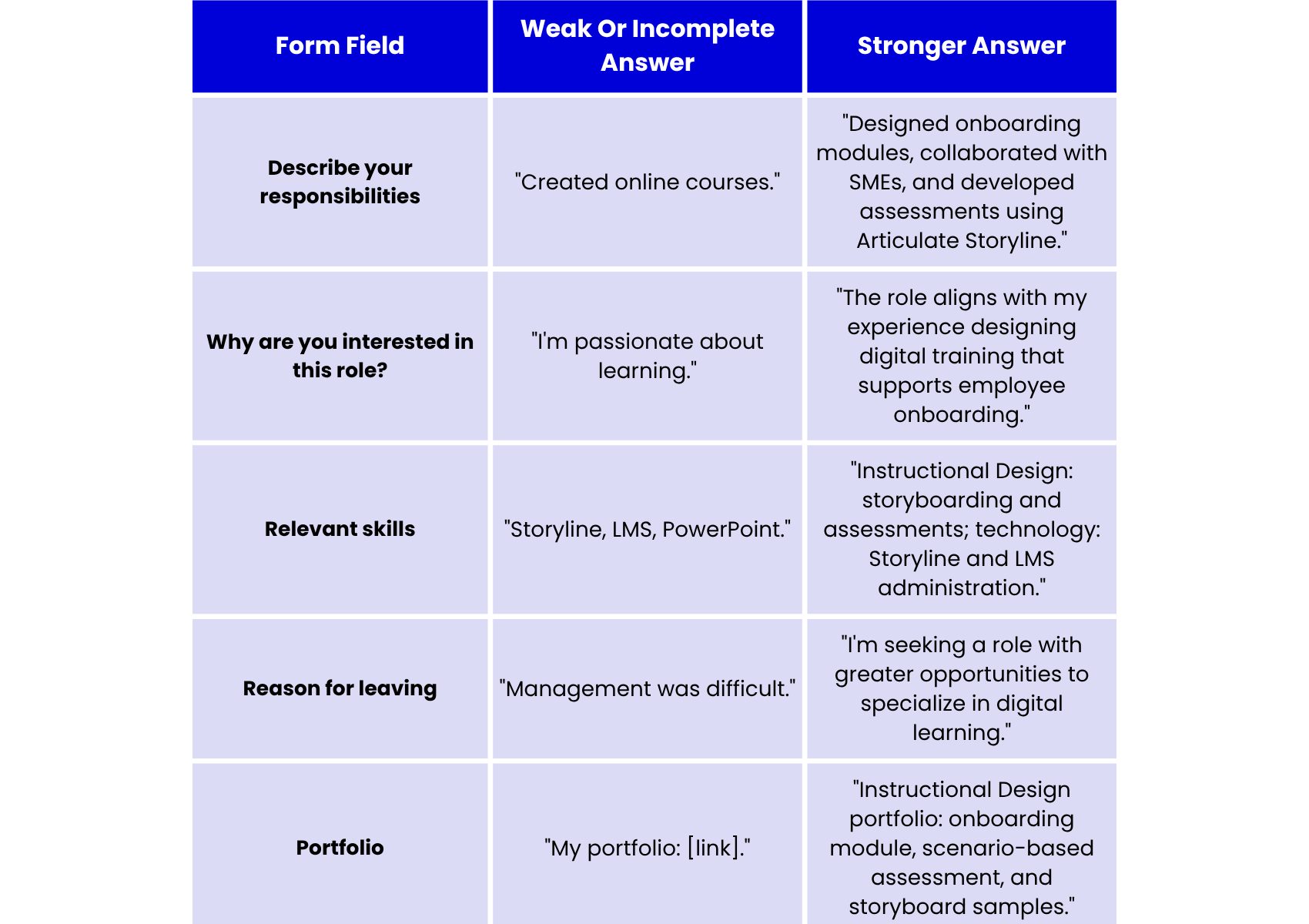
Make sure your examples match where you are in your career.
- Entry-level applicant: "Developed a sample onboarding module during an Instructional Design certification program."
- Career changer: "Applied classroom assessment and curriculum planning experience to a digital learning portfolio project."
- Mid-level Instructional Designer: "Collaborated with Subject Matter Experts to redesign employee onboarding and develop interactive assessments."
- Senior L&D professional: "Led cross-functional learning initiatives aligned with workforce capability needs and organizational priorities."
These examples are just for guidance, not to be copied as is. Only list projects, responsibilities, tools, and achievements that truly reflect your own experience.
What Are The Most Common Job Application Form Mistakes?
Job application forms might look simple, but even small mistakes can impact how employers see your application. Even if you’re qualified, it’s easy to miss details when filling out several forms. Here are some common mistakes to watch out for.
1. Inconsistent employment dates or job titles can cause confusion. Check that your work history matches your resume. If your official job title is different from what you usually use, explain the difference.
2. Leaving required fields blank is a common mistake. Go through each section carefully. Only write “see resume” if the employer specifically says it’s okay.
3. Using generic answers can hurt your chances. Customize your responses for each job instead of pasting the same information into every application.
4. Listing only your responsibilities isn’t enough. Share what you accomplished in each role and include specific results when you can.
5. Uploading the wrong documents is easy to do. Make sure you attach your most recent resume and any other files the employer asks for.
6. Broken portfolio links can stop employers from seeing your work. Test your links to make sure they work and don’t require special access.
7. Incorrect contact information can keep recruiters from reaching you. Double-check your email and phone number before submitting.
8. Exaggerating your qualifications or experience can backfire. Be truthful about your skills, certifications, responsibilities, and achievements.
9. Unrealistic salary expectations can hurt your chances. Take time to research fair compensation instead of just entering a random number.
10. Ignoring application instructions can lead to rejection. Follow all formatting rules, character limits, and any directions the employer gives.
11. Sharing unnecessary sensitive information. Avoid providing Social Security numbers, banking details, or other sensitive information without verifying the legitimacy and purpose of the request.
12. Submitting unchecked AI-generated answers. If you use AI to draft responses, review them for accuracy, relevance, consistency, and natural language.
13. Not saving your application can cause problems later. Keep a copy of what you submitted and any confirmation details for your records.
Taking a few extra minutes to review your application can help you catch mistakes and show your qualifications more clearly.
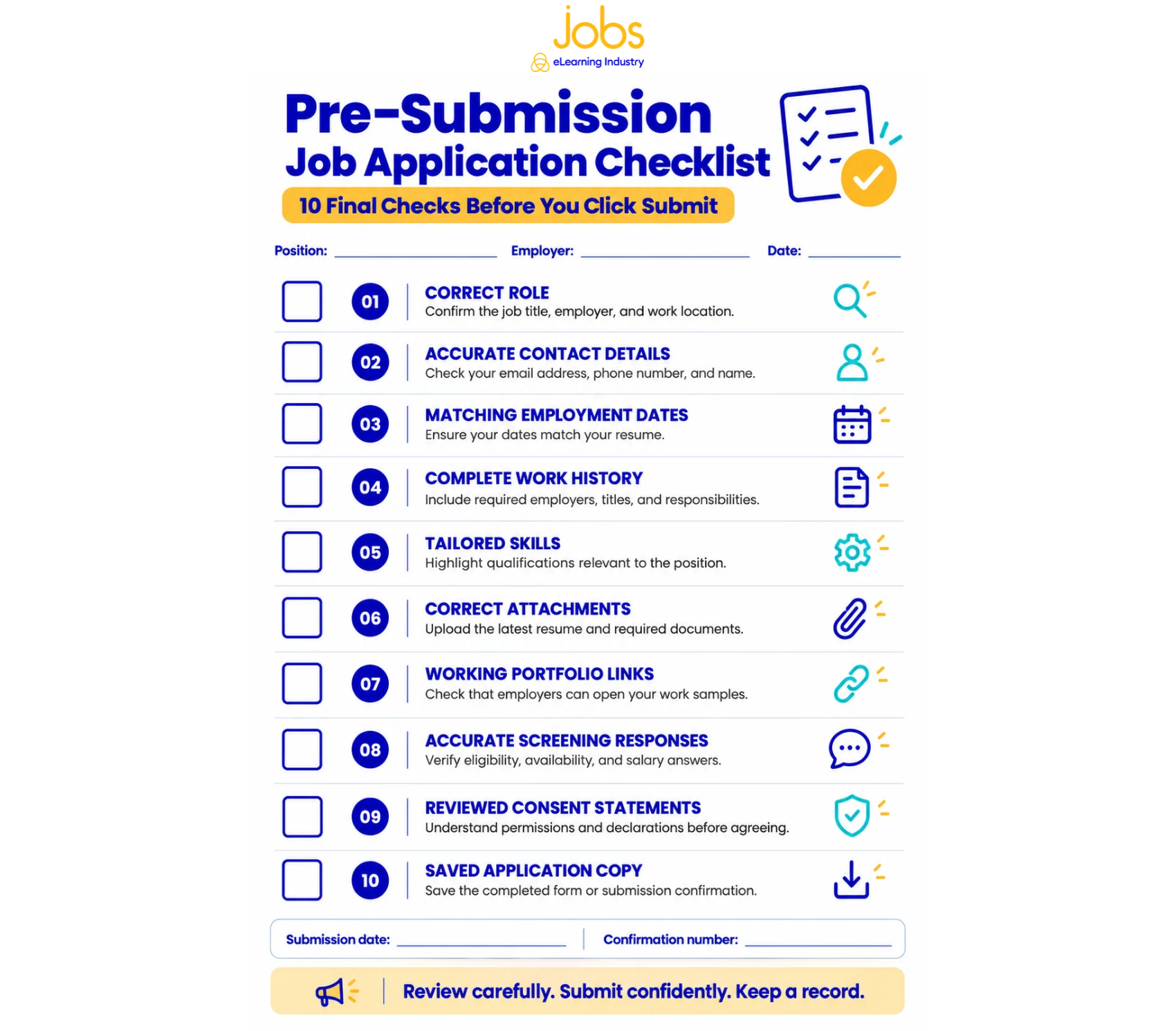
Job Application Form Checklist: What Should You Review Before Submitting?
Use this checklist to catch any mistakes before you send in your job application.
- The correct job title and location are selected.
- Contact information is accurate.
- Employment dates match the resume.
- Job titles and qualifications are truthful.
- Required sections are complete.
- Short answers address the actual questions.
- Screening answers are accurate.
- Attachments are current and correctly named.
- Portfolio links work without access requests.
- Sensitive information hasn't been shared unnecessarily.
- Consent statements have been reviewed.
- A copy or confirmation will be saved.
What Should You Do After Submitting A Job Application?
Submitting a job application is a big step. After that, keep your records organized and make sure you’re easy to reach if an employer contacts you.
- Save your confirmation email or application number.
- Record the employer, job title, submission date, and resume version.
- Keep the original job description.
- Review potential screening and interview questions.
- Monitor your email, spam folder, and voicemail.
- Follow up when appropriate, unless the posting discourages it.
- Continue applying for suitable opportunities.
- Set personalized job alerts for similar roles.
Your completed application may become the basis for future screening discussions. Therefore, use it to prepare for common job interview questions.
For a broader approach to finding roles and managing your applications, explore how to get a job in eLearning.
Ready to put your application checklist into practice?
Browse eLearning and EdTech jobs, upload your resume, and subscribe to personalized job alerts for opportunities matching your skills and experience.
FAQs About Job Application Forms
1. What Is A Job Application Form?
A job application form is an employer-controlled document used to collect standardized information from candidates. It typically requests contact details, employment history, education, qualifications, and availability. Employers may also include screening questions, references, declarations, and permissions that aren't covered in a traditional resume.
2. Why Do Employers Ask For A Job Application If I Already Submitted A Resume?
Employers use application forms to collect consistent information from candidates. Your resume may summarize experience selectively, while a form can request exact dates, previous employers, screening answers, and required declarations. This standardized structure can make information easier to review and compare.
3. Do I Have To Complete Every Field?
You should complete every required field that appropriately applies to your situation. Optional questions can generally be left unanswered unless the instructions say otherwise. If something doesn't apply, use "N/A" only when the form permits it. Don't enter inaccurate information simply to fill a field.
4. What Should I Put For My Reason For Leaving?
Provide a brief, truthful, and professional explanation. You might mention career progression, restructuring, relocation, or a change in professional direction if it accurately describes your circumstances. Keep the answer neutral and focused on relevant facts rather than personal criticism or unnecessary details about previous employers.
5. How Do I Fill Out A Job Application With No Experience?
Focus on relevant education, transferable skills, academic projects, internships, volunteer work, certifications, and portfolio samples. For example, an aspiring Instructional Designer could highlight a self-directed eLearning project or curriculum design experience. Make clear which activities were educational projects rather than paid employment.
6. Should I Provide My Social Security Number On A Job Application?
You generally shouldn't include your Social Security number on a resume or ordinary job application. The FTC warns applicants against sharing sensitive information unnecessarily, particularly before verifying that an employer is legitimate. Employers may request certain identifying information later for lawful background checks or employment processes. Always verify the request and use a secure channel.